Key takeaways
- A welcome message works when it offers one concrete kind of help on the page the shopper is looking at.
- The same store needs different greetings on the product page, the search results, the cart and after hours.
- Keep it to one or two lines, ask one question and say that it’s an AI.
- What shoppers ask follows the catalogue – write the greeting around the question your shoppers actually have.
- Give the agent a name and a voice that fit your brand, not a human disguise.
What is a website welcome message?
A website welcome message is the first line a visitor sees from your store – usually in the chat window, sometimes in a banner or pop-up. In an online store it has one job: invite the shopper to ask the question that stands between them and the cart. Three kinds of message do that job at different moments:
| When it appears | What it’s for | Example | |
|---|---|---|---|
| Welcome message | When the shopper opens the chat | Says who answers and what to ask | “Hi! I’m the store’s AI assistant – ask me about any product.” |
| Proactive greeting | By itself, on a chosen page, after a short delay | Offers help at a specific moment | “Hi! Need help finding a product?” |
| Opening line | In the first reply to the shopper | Moves from hello to the actual question | “Sure – what will you use it for?” |
In an AI chat agent for e-commerce, the welcome message and the agent’s name sit in the chat appearance settings, while proactive greetings are set page by page, each with its own trigger and delay. That split matters: the welcome message is the same everywhere, but the greeting should change with the page.
7 rules for a chat greeting that gets a reply
- Match the page. A shopper on a product page has a different question from one staring at an empty search result. Write for the page, not for the whole site.
- Offer one concrete kind of help. “Questions about size or delivery?” gets more replies than “How can I help?”, because the shopper recognises their own question in it.
- Keep it to one or two lines. It should read at a glance, on a phone, without covering the product.
- Say that it’s an AI. Shoppers ask more freely when they know what they’re talking to, and nobody feels misled when the answer arrives in a second.
- Speak the shopper’s language. A greeting in English on a German storefront is a closed door. Let the agent answer in the shopper’s language (multilingual chat).
- Time it for the page. On a no-results page, offer help as soon as it loads. On a product page, give the shopper a few seconds to look first.
- Don’t chase. If a shopper closes the greeting, don’t follow them with a new pop-up on every page.
The best greeting names the question before the shopper asks it: “which one?” on a product list, “will it fit?” on a car part, “when will it arrive?” in the cart.
Chat greeting examples by page
Twenty-five greetings for the pages where shoppers most often get stuck. Under several pages, the first example is the default greeting that comes with AskSpot’s proactive messages; the rest are variations you can adapt. Replace the brackets with your own details. For when to reach out first, and how to measure it, see proactive customer service.
Home page
- “Hi! I’m [name], the store’s AI assistant. Looking for something specific? Describe it in your own words.”
- “Tell me what you need – I’ll find it in our catalogue.”
- “Not sure where to start? Tell me who it’s for and your budget.”
Product page
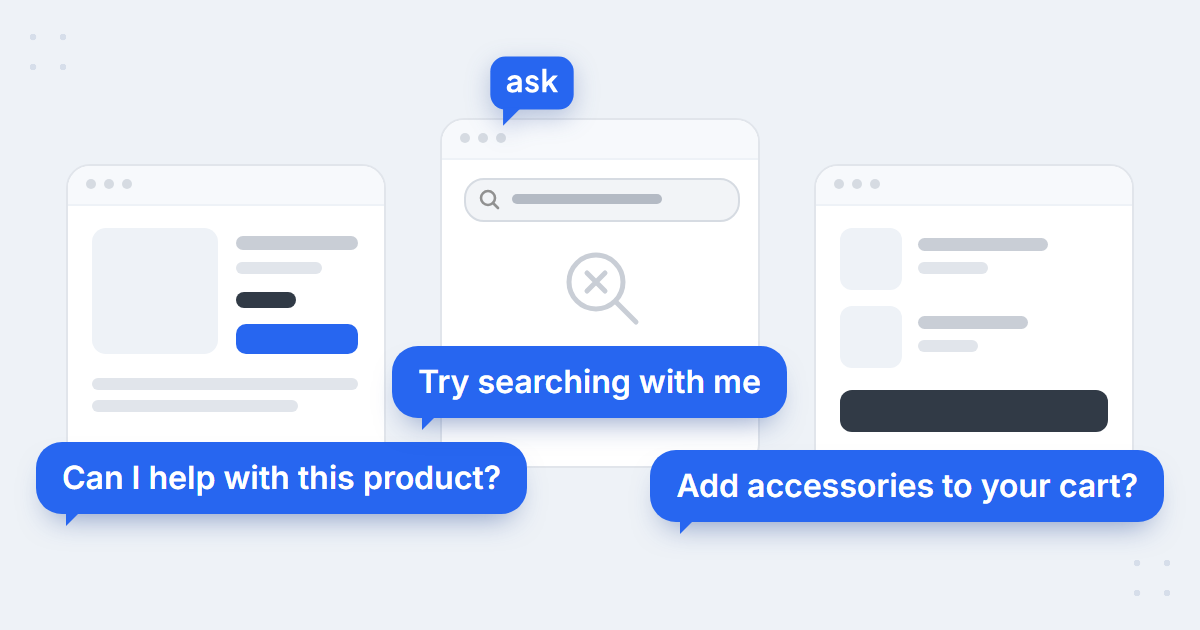
- “Hi! Can I help you with this product?”
- “Questions about size, specs or delivery for this product? Ask me.”
- “Not sure this is the right one? Tell me what you’ll use it for.”
- “Want to compare it with a similar model?”
Search results
- “Hi! Need help finding a product?”
- “Lots of results? Tell me what you need and I’ll narrow them down.”
- “Describe what you’re looking for in your own words – or send me a photo.”
No search results
- “Hi! Try searching with me”
- “Couldn’t find it? Describe it and I’ll check the whole catalogue.”
- “Maybe we call it something else – tell me what it’s for.”
A no-results page is where a greeting earns the most: the shopper has told you exactly what they want and the site has just said you don’t have it. More on that moment in ecommerce site search vs AI chat.
Cart
- “Would you like to add accessories to your cart?”
- “Any last questions before you order – delivery, returns, sizes?”
- “Want to check the delivery date before you pay?”
Out-of-stock product
- “Want me to find a similar product?”
- “This one is sold out – shall I show you what’s available now?”
Blog
- “Hey! I’ve got something for you!”
- “Reading about [topic]? Ask me which product fits your case.”
After hours
- “The team is offline, but I’m here – ask me about products, delivery or your order.”
- “It’s late, but I can still check your order. Have your order number and email ready.”
- “Need a person? Leave your details and the team will get back to you in the morning.”
Evenings and weekends are when most stores have nobody at the desk – and when a large share of chats arrive (the case for 24/7 support). An after-hours greeting should say plainly what the agent can do right now and what waits for the team.
Returning shopper
- “Welcome back! Want to pick up where we left off?”
- “Good to see you again – still deciding between the two models?”
Chat greeting examples by store category
What shoppers ask follows the catalogue. Across the stores AskSpot runs on, advice on which product to choose and questions about specs lead on the median store, while compatibility questions are a footnote for most stores but run to a third of chats on car and motorbike parts stores:
28%
of chats ask “which one should I buy?” on the median store
AskSpot Internal Data
25%
ask about specs and product features on the median store
AskSpot Internal Data
up to 36%
of chats ask “will it fit?” on car and motorbike parts stores
AskSpot Internal Data
Full figures and method in AI chatbot statistics for e-commerce. So write the greeting around the question your category actually brings – ten examples:
- Fashion and footwear – “Not sure about the size? Tell me your usual size and I’ll check how this model fits.” · “Looking for something for an occasion? Tell me what it’s for.”
- Electronics – “Will it work with your device? Tell me the model and I’ll check.” · “Comparing two models? I’ll explain the difference.”
- Furniture – “Will it fit? Give me your room’s measurements and I’ll check.” · “Questions about delivery or assembly? Ask me before you order.”
- Car and motorbike parts – “Tell me your make, model and year – I’ll show only parts that fit.” · “Not sure it’s the right part? Send me the part number or a photo.”
- Beauty – “Tell me your skin type and I’ll suggest what to try.” · “Looking for something gentle for sensitive skin? Ask me.”
From greeting to sale: a short chat script
A greeting only opens the door. A good chat script then moves in four steps:
- Greeting – one concrete offer of help, matched to the page.
- Clarifying question – what it’s for, size, budget, the model it has to fit.
- Recommendation – one or two products from the catalogue, with the reason they fit.
- Next step – add to cart, or answer the last question that stops the order.
 spot
See greetings working on your own store
Book a short demo – we’ll set up page-by-page greetings on products from your catalogue.
Chat transcript examples from a real online store
A script is a starting point. These three conversations come from a specialty coffee store running AskSpot – real shopper questions, shortened to the key turns, with the products and prices the store showed. Each one starts the way a good greeting invites: with the shopper’s own question.
Transcript 1: finding the part that fits
Shopper: Which water filter fits a Jura E8 EC?
AI agent: The EC version of the E8 runs on CLARIS Smart PLUS cartridges – that’s the chipped generation, the older Claris Blue won’t seat in it.
Product shown: Jura CLARIS Smart PLUS water filter – €15
Shopper: Anything cheaper? I change it every two months.
AI agent: Then the three-pack pays off – six months’ worth, and it works out at €14.80 each instead of €15.
Added to cart: 3x Jura CLARIS Smart PLUS water filter, set – €44
Why it works: the agent answers for the exact model, says why the older cartridge won’t fit, and turns a price question into a bigger basket – without a discount.
Transcript 2: a discount code that won’t apply
Shopper: My newsletter discount code isn’t working – I enter it and the total doesn’t change.
AI agent: Let me check. The welcome code doesn’t stack with items that are already reduced, and the coffee in your basket is on promotion.
Shopper: So there’s nothing I can do?
AI agent: We can work out which is worth more. The promotion on that coffee is 17%, the welcome code is a flat €5 – on your basket the promotion wins, so keep the code for your next order. It’s valid for 90 days.
Why it works: the agent explains the rule behind “it doesn’t work”, shows the shopper they already have the better deal and keeps the code for a second order. Discount-code questions are among the most common in the cart – see why shoppers abandon carts.
Transcript 3: getting over the free-delivery threshold
Shopper: What do I have to spend to get free delivery?
AI agent: €46. Your basket is at €39, so you’re €7 short.
Shopper: Then recommend me a small coffee so I get free delivery.
AI agent: This one covers the gap almost exactly, and it goes with what’s already in your basket:
Added to cart: HAYB Konesso Filter Blend beans 250g – €7. Delivery: free.
Why it works: the agent does the maths from the live basket and suggests a product that fits both the gap and the shopper’s taste. The store behind these chats is Konesso – see how 1 in 5 of its chats ends in an order.
What to name your store’s AI agent
The name shows in every greeting, so it’s part of the welcome. Name, avatar and tone are set together in the chat window settings. Three approaches work for most stores:
- Your brand plus a role – “[Store] Assistant”, “[Store] Advisor”. Clear, safe, and it never needs explaining.
- A role that says what it does – “Size Advisor”, “Parts Finder”, “Coffee Guide”. Good when one question dominates your store.
- A short first name that fits your voice – “Mia”, “Leo”, “Max”. Friendly, as long as the greeting still says it’s an AI.
Whichever you choose: keep it short, check that it reads well in every language your store sells in, and don’t borrow the name of a real person on your team – shoppers will ask for them by name.
Chatbot name ideas for online stores
- Brand plus role: “[Store] Assistant”, “[Store] Advisor”, “[Store] Helper”, “Ask [Store]”
- A role that says what it does: “Size Advisor” (fashion), “Parts Finder” (car parts), “Coffee Guide” (coffee), “Gift Finder” (gift shops), “Style Advisor”, “Garden Helper”
- A short first name: “Mia”, “Leo”, “Max”, “Ava”, “Nora”, “Theo” – easy to read and say in most languages
Greeting mistakes that cost replies
- One generic line everywhere. “How can I help?” on every page tells the shopper nothing about what the chat can do.
- A pop-up the moment every page loads. It covers the product before the shopper has seen it.
- A paragraph instead of a line. Nobody reads a welcome speech on a phone.
- Pretending to be a person. It falls apart at the first instant answer, and trust goes with it.
- Promising what the agent can’t do. Don’t offer a discount, a call-back or a delivery date the store can’t actually give.
- An expired campaign in the greeting. A sale greeting still running after the sale is worse than none.
Once the greeting works, the conversation behind it has to hold up too – how the agent hands over to your team is covered in live chat vs AI chat, and how other tools compare in our roundup of e-commerce AI chatbots.
FAQ
What should a website welcome message say?
Who is answering, and one concrete thing the shopper can ask about – for example “Hi! I’m the store’s AI assistant – ask me about sizes, delivery or any product.” One or two lines is enough.
What is a good greeting for a chatbot?
One that matches the page and offers a specific kind of help: “Not sure this is the right one? Tell me what you’ll use it for” on a product page, “Try searching with me” on a no-results page. Generic greetings such as “How can I help?” get fewer replies.
How long should a chat greeting be?
One or two short lines – short enough to read at a glance on a phone without covering the product.
When should a chat greeting appear?
It depends on the page. On a no-results page, straight away; on a product page, after the shopper has had a few seconds to look. Set the trigger and delay per page rather than one rule for the whole site.
Should a chatbot say it’s an AI?
Yes. Shoppers ask more freely when they know what they’re talking to, and a greeting that pretends to be a person falls apart at the first instant answer.
What should I name my chatbot?
Your brand plus a role (“[Store] Assistant”), a role that says what it does (“Size Advisor”), or a short first name that fits your brand voice. Keep it short, check it in every language you sell in, and don’t use the name of a real employee.
What does a good customer service chat transcript look like?
The shopper asks in their own words, and the agent answers the exact question from the store’s data – a specific product, rule or order – then offers the next step, such as adding to the cart. Short replies, no loops, and a clear way to a person when needed.
What should I name my store’s chatbot?
Pick a name that is short, fits your brand and reads well in every language you sell in: your brand plus a role (“[Store] Assistant”), a role that says what it does (“Size Advisor”), or a short first name (“Mia”). Whatever you choose, the greeting should still say it is an AI.