Key takeaways
- Decide the job first: a store chatbot that sells before the purchase needs different data than one that supports after it.
- There are three ways to build one: a no-code builder, a framework or model API you develop on, or a ready e-commerce agent.
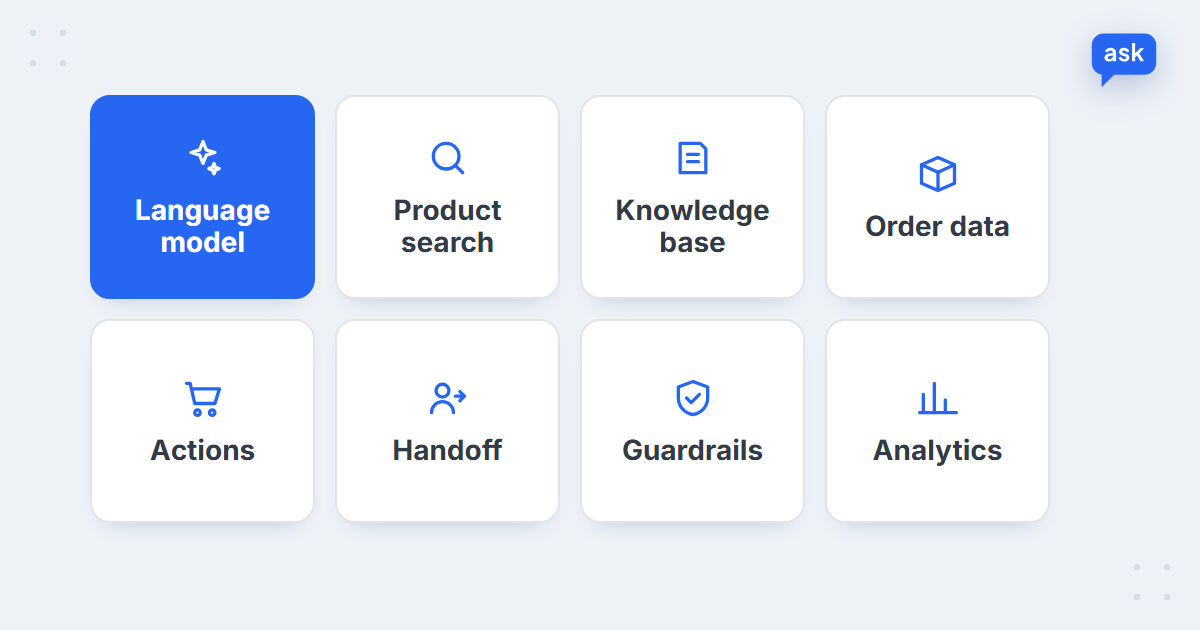
- The language model is one component out of eight – product search, knowledge base, order data, actions, handoff, guardrails and analytics make up the rest.
- Our data turns into hard requirements: attribute-level product data, multiple languages, voice messages and conversation memory.
- Test with real shopper questions – including the ones the bot should refuse – before you go live.
Start with the job, not the tool
Before choosing a framework, decide what the chatbot is for. In an online store there are two very different jobs:
- Selling before the purchase – helping shoppers find and compare products, answering specs and fit questions, adding to the cart. This needs your catalogue.
- Supporting after the purchase – order status, returns, invoices, cancellations. This needs your order data and policies.
The split in real traffic is clear. In our AI chatbot statistics, 74% of chats on the median store are pre-purchase, while 66% of support emails are about orders already placed. A chat widget on your storefront is mostly a sales tool; your support inbox is mostly an order tool. Build for the job that matches the channel, or plan for both from the start.
Three ways to build an AI chatbot
| Approach | What you get | What you still build | Skills needed |
|---|---|---|---|
| No-code chatbot builder | A widget, a flow editor, often an AI answer feature trained on pages or FAQs | Catalogue search beyond basic matching, order lookups, store-specific logic – often not possible at all | None to start; limited ceiling |
| Framework or model API | Full control: frameworks like Rasa or Dialogflow, or a language model API with tool calling | Everything in the architecture below – search, integrations, guardrails, widget, analytics, hosting | Developers, ongoing |
| Ready e-commerce agent | Catalogue search, order integrations, actions, languages and analytics built for stores | Your knowledge base, settings and the integrations specific to your setup | Store team; developer only for custom systems |
The rest of this guide follows the middle path – building it yourself – because that’s where the real work shows. For what each approach costs over time, see AI chatbot cost: build vs buy.
The architecture of a store chatbot
A chatbot that works in an online store is a system, not a prompt. These are the components it needs:
| Component | What it does | What to watch |
|---|---|---|
| Language model | Understands the question and writes the reply | Model updates change behaviour; plan for regular re-testing |
| Product search | Finds products in your catalogue by meaning and attributes | Feed sync schedule, attributes like size and compatibility, stock and price freshness |
| Knowledge base | Holds policies: shipping, returns, payments, warranty | One source of truth that the team keeps current |
| Order data | Looks up a specific order’s status and details | Verify the customer before showing anything |
| Actions | Adds to cart, records a cancellation, tags a ticket | Which actions run alone and which need a person to confirm |
| Handoff | Passes the conversation to your team | Context travels with it, so the customer doesn’t repeat themselves |
| Guardrails | Keeps answers in scope and grounded in your data | Prompt injection, made-up facts, off-topic and sensitive questions |
| Analytics | Measures resolution, cart-adds and topics | Track resolved conversations, not just handled ones |
The model is the part everyone talks about and the part you’ll spend the least time on. Most of the build – and most of the maintenance – sits in the other seven boxes.
How to build an AI chatbot for your store, step by step
1. Load the catalogue and make it searchable
Import your product feed and index it so the bot can search by meaning (“something warm for winter hikes”) and by attributes (size, colour, compatibility, price). Keyword search alone fails on the questions shoppers actually ask. Decide how often the feed syncs – AskSpot, for example, syncs the catalogue daily – and make sure stock and prices in answers never contradict the product page.
2. Write the knowledge base
Shipping costs and times, returns, payment methods, warranty, store locations. Write entries in plain language the AI can quote, one topic per entry. Our guide to the chatbot knowledge base covers what to include and how to keep it current.
3. Write the instructions
The system instructions define the bot’s scope (what it helps with), tone (how it speaks for your brand) and refusals (what it never does – guess a fit, promise a discount, give medical or legal advice). Keep them specific and test every change, because small wording changes shift behaviour.
4. Connect order data behind verification
Connect your store platform or order system through its API so the bot can answer “where is my order?” with the real status and tracking number. Never show order details without verifying the customer – for example with the order number and the email used to place it. More in how AI answers “where is my order?”.
5. Add actions
Through tool calling, the model can trigger functions you define: show product cards, add an item to the cart, record a cancellation request, tag a ticket. Start with low-risk actions and decide which ones need a person to confirm.
6. Put it where your customers are
A chat widget on the storefront is the start. Support email, marketplace messages and a mobile shopping app are separate integrations – each with its own API, formats and quirks.
7. Add guardrails
Ground every answer in your data, refuse what the data can’t support, and defend against prompt injection – shoppers trying to make the bot ignore its instructions, reveal them or offer something it shouldn’t. See how to prevent AI hallucinations in e-commerce.
8. Add handoff and logging
Route cases that need a person to your team with a summary, and log every conversation with its outcome. Without logs you can’t see what’s failing; without handoff, every failure lands on the customer.
What our data says your chatbot must handle
We looked at 205,731 chats handled by AskSpot agents on European online stores in one month. Each finding turns into a requirement for anyone building a store chatbot:
36%
of chats are about compatibility on the highest store
AskSpot Internal Data
61%
of chats arrive outside office hours on the median store
AskSpot Internal Data
8.3
messages per chat on the median store
AskSpot Internal Data
| What we see | What your build needs |
|---|---|
| Compatibility and fit questions are 5% of chats on the median store, but up to 36% on car and motorbike parts stores | Product data at attribute level – sizes, models, years – not just names and descriptions |
| 61% of chats arrive outside Monday–Friday, 9:00–17:00 | A bot that resolves on its own, because at those hours there’s often nobody to hand over to |
| Chats come from storefronts in 21 countries | Answers in the shopper’s language, from the same catalogue |
| About 1 in 35 chats includes a voice message | Voice input, not just text |
| A chat runs to 8.3 messages – about four questions from the shopper | Conversation memory, so “and in blue?” still means the same product |
Here’s what that looks like when the pieces work together – an attribute-level fit question, answered from the catalogue and finished with an action:
 spot
See all eight components working on your store
Book a short demo – we’ll show AskSpot answering questions from your catalogue and orders, before you commit to building anything.
How to test your chatbot before launch
- Build a test set from real questions – your chat logs, support inbox and product-page Q&A – not questions your team invents.
- Ask what it shouldn’t answer: a fit the data can’t confirm, a discount that doesn’t exist, a medical or legal question, a request to ignore its instructions.
- Test languages, typos and voice, not just clean English.
- Check every answer against the source – price, stock and policy must match the product page and the knowledge base.
- Launch in draft mode or on limited traffic first, so the team reviews answers before customers rely on them.
- Measure resolution, not deflection – a conversation the bot ended isn’t one it solved. See deflection vs resolution rate.
Re-run the same test set after every change – a new model version, an edited instruction, a new integration. Behaviour that was fine last month can drift without anyone touching the bot directly.
When to buy instead of build
Building your own makes sense when the chatbot is your product, or when your store runs on systems no ready tool can connect to. For most stores, the eight components above are the same problems every store has – and a ready e-commerce agent has already solved them: catalogue search, order lookups behind verification, actions, more than 200 languages, handoff, guardrails and analytics. What’s left for you is the part only you can do – your knowledge base and your rules.
We compare the long-term costs in AI chatbot cost: build vs buy. If you’d like to see a ready agent on your own catalogue first, AskSpot has a 7-day free trial – and pricing is per conversation.
FAQ
Can I build a chatbot for my store with ChatGPT?
You can use a language model like the one behind ChatGPT as the core, through its API. On its own it doesn’t know your products, stock or orders, so you still need product search, order integrations, actions, guardrails and a widget around it.
Do I need to fine-tune a model?
Usually not. Store chatbots work best when the model looks up answers in your catalogue and knowledge base at the moment of the question. That keeps answers current when prices and stock change – which a fine-tuned model can’t do.
Is a no-code chatbot builder enough for an online store?
For simple FAQs, often yes. For product advice from a large catalogue, fit questions or order lookups, most no-code builders hit their limits – check whether the builder can search your catalogue by attributes and connect to your orders.
Which chatbot framework should I use?
It depends on your team. Frameworks such as Rasa or Dialogflow give structure for conversation flows; building directly on a language model API with tool calling gives more flexibility. Either way, the framework covers the conversation – the catalogue, order and channel integrations are still yours to build.
How do I stop a chatbot from making things up?
Ground answers in your own data, instruct the bot to refuse what the data can’t support, hand over to a person when unsure, and test with questions it shouldn’t answer. See how to prevent AI hallucinations.
Want the bigger picture first? Our guide to conversational AI explains how the technology works and how to choose a platform. For the support side – what to automate and what to keep human – see AI customer service for e-commerce.