Key takeaways
- IdoSell connects through an API key you generate under Settings → API → Access.
- Set OMS to read and write; leave every other access at no access.
- You add two things in your AskSpot panel: the API key and your store link (with
https://). - You do it yourself in partners.askspot.io – no need to send us anything.
What the connection does
IdoSell manages your orders through its OMS. With an API key scoped to OMS, an AI Chat Agent built for e-commerce can look up an order status and answer “where is my order?” in the shopper’s own words, at any hour. You generate the key once, scope it tightly, and add it with your store link in your AskSpot panel.
Before you start
- Access to your IdoSell admin panel.
Step 1 – Generate an API access key
- In the admin panel, go to Settings → API → Access.
- Add a new key.
- Set the access levels, then save the changes.
Set OMS to “read and write”. Every other API gateway access can stay at “no access” – the Agent only needs order data.
Step 2 – Add the details to AskSpot
You add the connection yourself in the AskSpot partner panel – there is no need to send us the key:
- Sign in to partners.askspot.io.
- Open the AI Chats section and go to Order handling.
- Click Add order platform and choose IdoSell Shop from the list.
- Enter your Domain name (with
https://, e.g.https://yourstore.idosell.com) and paste the API key you generated into the API key field, then click Save connection.
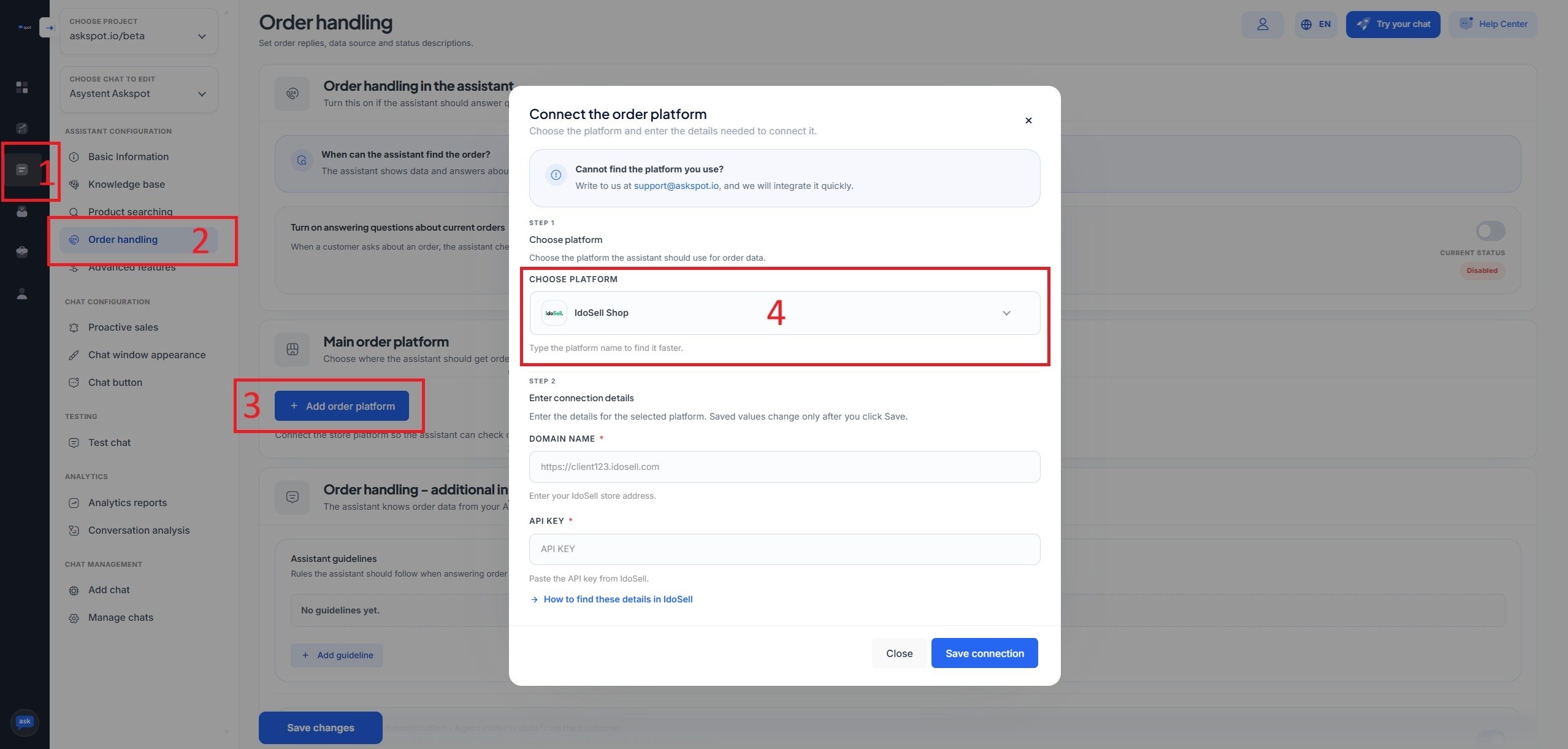
Include the https://. Give the store link with the https:// prefix – https://yourstore.idosell.com, not yourstore.idosell.com. And treat the API key as confidential: paste it only into your own AskSpot panel, never publicly.
Stuck? Ask the Help center. The AskSpot panel has a Help center in the top-right corner. Tell it what you want to set up and it walks you through connecting and configuring the Agent – you don’t have to do it alone.
From then on the Agent reads orders straight away – the connection behind “where is my order?” answered without a human.
Want the AskSpot chat on your storefront too? See how to add the AskSpot chat to IdoSell. For placement, display options and the full picture, see the IdoSell integration.
Where do I generate the API key?
In the IdoSell admin, under Settings → API → Access. Add a new key and set OMS to read and write, with everything else at no access.
What do I enter in AskSpot?
Two things, in the Order handling form: the generated API key and your store link on IdoSell, including the https:// prefix.
Do I need to install anything?
No. IdoSell’s API is built in – you only generate a scoped key and add it in your AskSpot panel. Adding the chat widget to the storefront is a separate, optional step.