Key takeaways
- AtomStore exposes order data through the Atom REST API – it must be active on the store.
- Create a dedicated admin account for the integration with API access enabled.
- Grant
users/authorize(required) andorders/get(required);orders/indexis optional. - You add three things yourself in your AskSpot panel: the store domain, the API login and its password – no need to send us credentials.
What the connection does
AtomStore exposes your data through the Atom REST API. You create a dedicated admin account for the integration, enable API access, and grant it the order methods – and from then on an AI Chat Agent built for e-commerce can look up an order and answer “where is my order?” in the shopper’s own words, at any hour. A dedicated account keeps you in full control: you can revoke it any time without affecting your team.
Step 1 – Check the Atom REST API module
Before creating access, make sure the Atom REST API module is active on your store. To check:
- Sign in to the AtomStore admin.
- Go to SETTINGS → ADMINISTRATORS.
- Open any administrator account and check whether an “API access” option is shown.
No “API access” option? If the admin account has no option to enable API access, the REST API module has not been activated yet. From the admin panel, ask AtomStore support (BOK) to activate the Atom REST API with access to the order-related methods.
Step 2 – Create a dedicated admin account
For safety, create a separate admin account just for the integration – rather than sharing your own login. You keep full control and can revoke access any time without affecting your team.
- In the AtomStore admin, go to SETTINGS → ADMINISTRATORS.
- Click to add a new administrator.
- Set a login (e.g. integration-api) and a strong, unique password.
- Tick “API access” – a list of methods to configure appears.
- Grant the methods listed in Step 3.
- Save your changes.
Step 3 – Required API methods
The account must have these API methods enabled. Without them the integration will not work:
| API method | Purpose |
|---|---|
users/authorize (required) | Log in and obtain the authorization token. This is the key method – without it no other API call works. |
orders/get (required) | Fetch the details of a single order by its ID. |
orders/index (optional) | Fetch the list of orders. |
Important. users/authorize is absolutely required – it returns the token that authenticates every subsequent request. The token is valid for 60 minutes from the last successful call.
Step 4 – Add the details to AskSpot
That is the AtomStore side done. You add the connection yourself in the AskSpot partner panel – there is no need to send us the credentials:
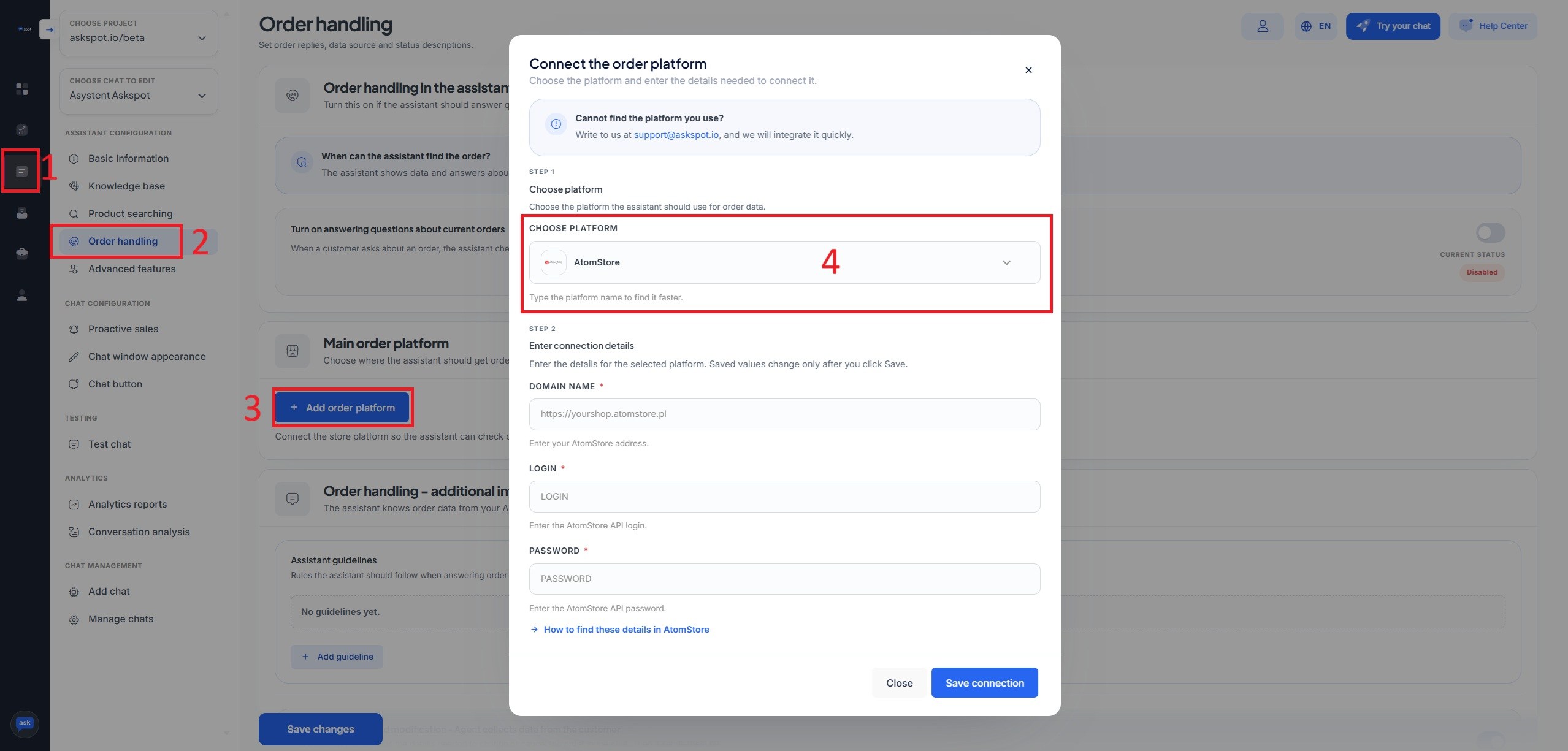
- Sign in to partners.askspot.io.
- Open the AI Chats section and go to Order handling.
- Click Add order platform and choose AtomStore from the list.
- Enter the three values below, then click Save connection.
| Field | Value to enter |
|---|---|
| Domain name | your store address with https://, e.g. https://yourshop.atomstore.pl |
| Login | the API login of the account you created, e.g. integration-api |
| Password | the API password of that account |
Domain format. Enter the address with the https:// prefix – for example https://yourshop.atomstore.pl. Can’t find AtomStore in the platform list? Use the “How to find these details in AtomStore” link in the form, or ask your AskSpot customer success manager.
Stuck? Ask the Help center. The AskSpot panel has a Help center in the top-right corner. Tell it what you want to set up and it walks you through connecting and configuring the Agent – you don’t have to do it alone.
From then on the Agent reads orders straight away – the connection behind “where is my order?” answered without a human.
For placement modes, display options and the full picture, see the AtomStore integration.
Next – measure conversions. Once the chat is live, connect Google Analytics to see which conversations lead to sales. See how to track the AskSpot chat in Google Analytics.
What if there is no “API access” option?
It means the Atom REST API module is not active yet. Ask AtomStore support (BOK) from the admin panel to activate the Atom REST API with the order-related methods.
Which methods does the integration need?
users/authorize and orders/get are required; orders/index is optional. The Agent only reads, so it cannot change anything in your store.
How should I format the store domain?
The address with the https:// prefix – for example https://yourshop.atomstore.pl. You enter it in the Domain name field in your AskSpot panel.